Pocket is gone.
Keep listening.

Mozilla retired Pocket in July 2025, and its listen feature went with it. Orateur picks up the habit: save any article by link, hear it read aloud, resume where you stopped.

What replaces Pocket's article listening?

Orateur, a free web app, covers Pocket's listen use case: paste an article's link and it is read aloud with a natural voice, with synced text and paragraph-level resume. Unlike Pocket, there is no account — your library lives in your browser, so no shutdown can take it away.

Essay · 12 min · English

The art of slow reading in the age of endless feeds

The patience slow reading demands is precisely what modern feeds erode by design.

Yet the best essays ask you to linger — and that's exactly what the feed prevents…

Block 4 / 18

example.com
The art of slow reading

00:42 · 12:34

1.0×

The extension

Save it the way
you used to.

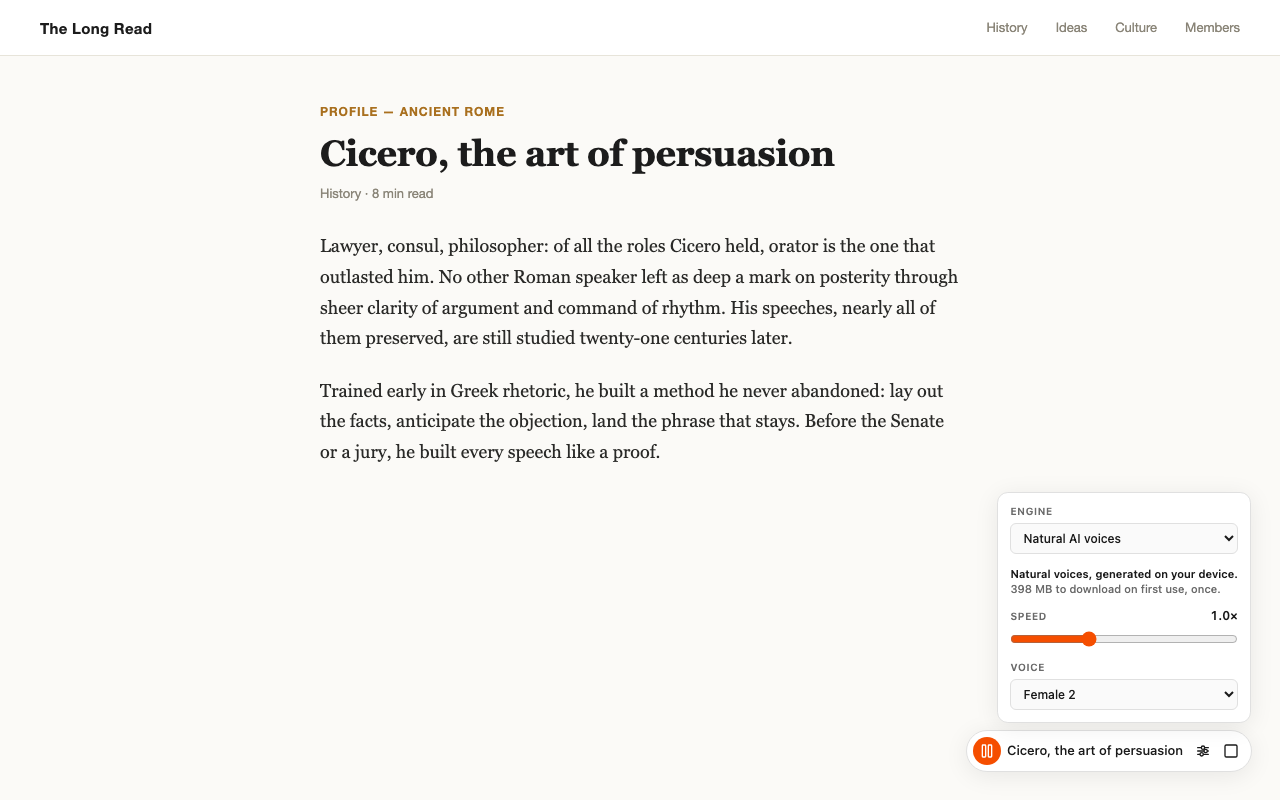
Pocket lived in your toolbar. So does Orateur: one click on the icon and the article you are reading goes straight to your library — or press play on the pill sitting at the bottom of the page to hear it read aloud without saving it at all.

The Orateur pill playing at the bottom of an article, unfolded to its settings: voice engine, speed and voice choice.

One click from the page.

The same gesture Pocket trained you into, minus the account it needed to work.

Listen without saving.

Press play on the pill when you only want to hear it once.

Nothing to shut down.

Saved articles land in your browser, not on a service that can be retired.

Why Orateur

Listen was a feature.
Here it's the product.

Built around listening.
Pocket read articles aloud as a side feature. Orateur is designed for it: guided playback, adjustable speed, text that follows the voice.
Resume like a podcast app.
Pocket restarted articles from the top. Orateur suspends at the exact paragraph and picks up there — days later, same browser.
Un-sunsettable.
Your articles are stored in your browser, not on our servers. There is no account to close and no company decision that can delete your library.

The switch

Same habit.
New home.

  1. 01

    Save

    Paste the link of any article you would have sent to Pocket. It is extracted and split into listenable blocks.

  2. 02

    Listen

    A natural voice reads the article while the text scrolls in sync — speed and voice are up to you.

  3. 03

    Resume

    Close the tab mid-article. Next time, playback restarts at the exact suspended paragraph.

FAQ

Common
questions.

Does Orateur read articles aloud like Pocket did?
Yes — that's its entire purpose. Paste a link and a natural voice reads the article while the text scrolls in sync.
Do I need an account like Pocket required?
No. There is nothing to sign up for; your library and listening positions are stored locally in your browser.
Is it free?
Yes, fully. The voice is generated on your device, so there is no subscription and no premium tier.
Can I import my Pocket export file?
Not yet. Today you re-save articles by pasting their URLs. If bulk import matters to you, say so via the feedback link — that's how features get prioritized.

Your reading list
deserves a voice.

Pocket's shutdown doesn't have to end the habit.

Save your first article