Free text to speech
for any article.

Paste a link and listen — no signup, no character limit, no trial that expires. The voice runs in your browser, so nobody meters your minutes.

Is there a free text-to-speech for articles — without an account?

Yes. Paste an article's URL into Orateur, or install the free Firefox/Chrome extension to skip the paste step entirely — either way it reads the piece aloud with a natural voice, entirely in your browser. There is no signup, no word limit, and no premium tier — on-device speech costs nothing to serve, so nothing is locked behind a paywall.

Essay · 12 min · English

The art of slow reading in the age of endless feeds

The patience slow reading demands is precisely what modern feeds erode by design.

Yet the best essays ask you to linger — and that's exactly what the feed prevents…

Block 4 / 18

example.com
The art of slow reading

00:42 · 12:34

1.0×

Skip the paste step

Free, and one
gesture shorter.

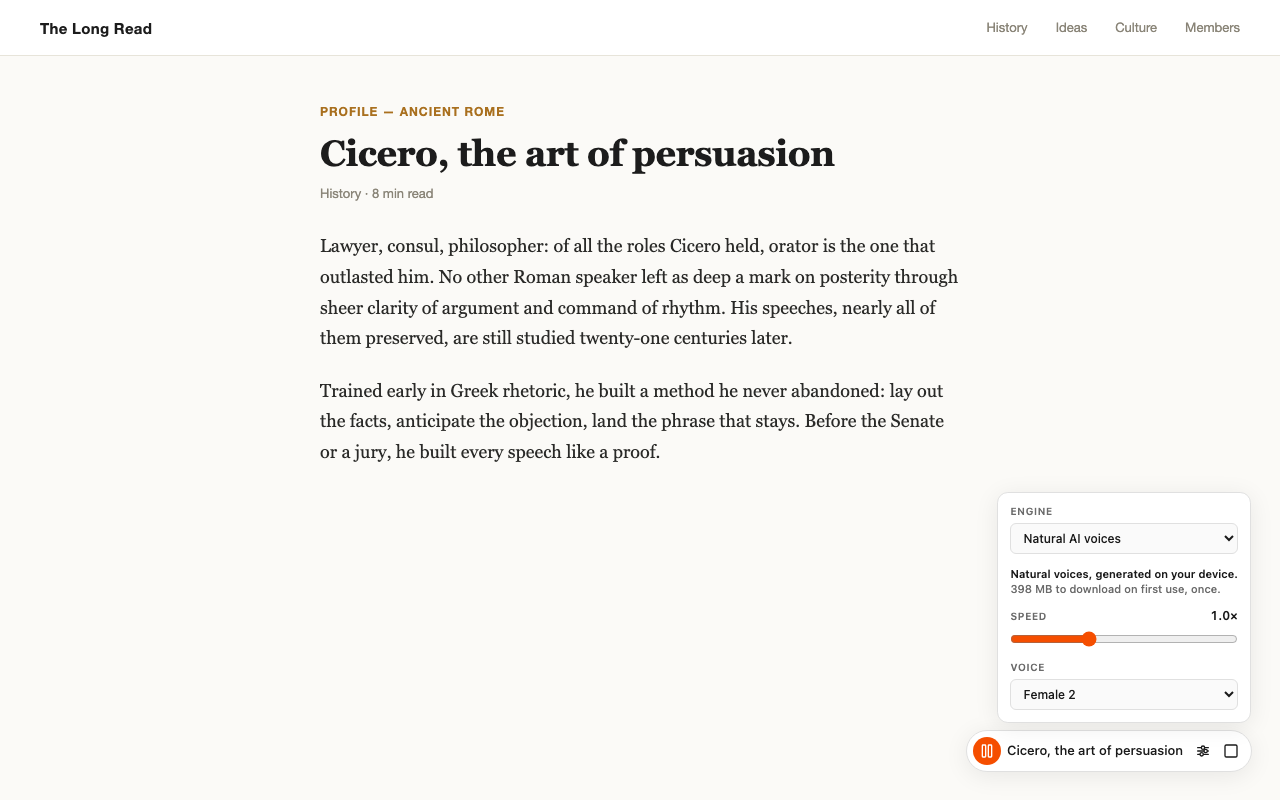
The Orateur extension puts a pill at the bottom of every page — no link to copy, no site to open. Press play and the article you're already reading is read aloud, free, with the same no-signup, no-limit voice.

The Orateur pill playing at the bottom of an article, unfolded to its settings: voice engine, speed and voice choice.

Reads the page you're on.

No pasting a URL first. The pill appears on the article itself — press play or right-click and choose "Read this page".

Still no account, still no limit.

Same free, on-device voice as the website — a 400-page site or a tweet-length note cost the same: nothing.

Save it for later, free too.

One click sends the article to your library so you can finish it in the same browser, whenever.

No catch

Free because
it's local.

No account, no trial clock.
Most TTS sites give you a few free minutes, then a subscription. Orateur has no meter to run out and nothing to sign up for.
No character limit.
Cloud TTS bills per character, so free tiers cap you. Orateur's voice is generated on your device — a 10,000-word essay costs the same as a tweet: nothing.
A reader, not a converter.
Adjustable speed, selectable voices, text that scrolls with the voice, and paragraph-level resume — not a bare MP3 download.

How it works

Paste.
Press play.

  1. 01

    Paste a link

    Any public article URL — or paste raw text, or drop a file. The article is extracted and split into listenable blocks.

  2. 02

    Listen

    A natural voice reads block by block while the text scrolls in sync. Change speed or voice anytime.

  3. 03

    Come back anytime

    Your spot is saved locally. Reopen the article and it resumes at the exact paragraph.

FAQ

Common
questions.

Is Orateur really free, or a free trial?
Free, with no trial period, no premium voices to unlock, and no account. The voice is synthesized on your device, which is what makes unlimited listening sustainable.
Is there a character or word limit?
No. Long-form essays, documentation, whole reports — the article is split into blocks and read end to end.
Do I need to sign up?
No. Open the site, paste a link, press play. Your library and listening progress are stored in your browser.
Can I download the audio as an MP3?
No — Orateur is a listening app, not a file converter. It reads in the browser and remembers your exact spot, which works better for articles than managing audio files.

Stop rationing
your listening.

Unlimited, free, and no account between you and your first article.

Listen to an article now